Record, refine and finish in one place. Keep the source available throughout.
01
Capture
Paste a supported stream link or open a local audio or video file. Recording includes a live waveform, elapsed time and optional automatic gain. When available, the stream title becomes the editable track name. With supported playback controls, the session can stop when the video ends.
02
Refine
Set precise IN and OUT points, audition the selection and save it as a separate file. Change pitch by ±12 semitones and speed from 0.50× to 2.00× independently. Choose a profile for a mix, voice or percussion.
03
Finish
Compare the original and edited audio at matched listening levels. Jump to the beginning or seek on the waveform. Rename the track, then choose the source level, peak protection or loudness normalization for export.
02 / LISTENING ROOM
Same phrase. New feel.
Hear what changes when pitch moves and the beat stays put. Then slow down the same phrase while keeping its pitch.
Original studio loop · StereoA / B / C
Original pitch · 1.00× speed
Three prepared versions of an original synth loop, processed with the Timbrelio pitch and tempo engine.
03 / SIGNAL ANALYSIS
See what your ears hear.
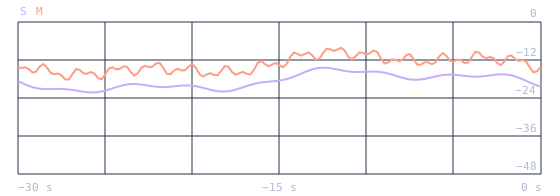
Watch the stereo channels and loudness history while recording and listening. Use the measurements to judge level, headroom and dynamics.
Signal analysis
EXAMPLE VALUES
Integrated
−16.8 LUFS
Short-term
−15.3 LUFS
Momentary
−14.1 LUFS
True Peak
−2.1 dBTP
RMS
−19.2 dBFS
LRA
4.1 LU
PLR
14.7 dB
Loudness · LUFS
Integrated covers the measurement so far. Short-term and Momentary follow the last 3 seconds and 400 milliseconds.
Peaks & dynamics
True Peak estimates peaks between samples. RMS describes signal energy, LRA shows loudness range, and PLR shows the gap between peak and integrated loudness.
04 / LOCAL LIBRARY
Every take has a home.
Recordings are archived in your Music folder under Timbrelio. Add existing files and find the original, current edit, named versions and exports together.
Search and play
Find tracks and versions by name. Play originals, edits or exported files directly in the Library.
Pick up where you left off
Load a track or saved version into the studio, or search the Library from Playback. Your trim, pitch, speed and material profile are stored with the edit.
Share a copy
Drag a track to a compatible app to share a copy of the original, or drag an export to share that exact file.
02 / THE STUDIO, IN DETAILT / 02
05 / OUTPUT
The right format for the next step.
Keep a lossless master, make a compact listening copy or convert an entire folder in one pass.
Lossless and PCM
WAV
FLAC
AIFF
M4A ALAC
Lossy compression
MP3
M4A AAC
Opus
Ogg Vorbis
WAV supports 32-bit float. The batch converter offers sample rate, channels, bit depth or bitrate, fades, metadata and a conversion log.
06 / GOOD TO KNOW
Before your first session.
What do I need to run Timbrelio?
Timbrelio 3.4 is a native ARM64 desktop application for the desktop system version 14.2 or later. The website and its listening demo also work on phones and tablets.
What can I record from a link?
Timbrelio accepts supported HTTPS video links and records audio from playback in the supported desktop browser. Use sources you have permission to record. Browser audio and automation permissions may be needed. Pause other tabs because their audio can be picked up too.
What happens at the end of a video?
Automatic stop is enabled when you open the app and can be turned off for the session. It uses the browser’s playback status. If the end cannot be detected, for example with some live streams or loops, stop the capture manually.
Where are my files kept?
Audio processing runs locally. Recordings, their edits and archived exports live under Music → Timbrelio. You can choose a destination for an additional export copy.
 Timbrelio